Operate

AI GatewayRoute and control every model request.ObservabilitySee every request, token, error and latency signal.ReliabilityIncidents, provider health, latency and failures.

Analyze

Costs & FinOpsUnderstand spend, budgets and cost allocation.OptimizationFind measurable savings across models and routing.

Control

GovernancePolicies, roles, approvals and audit controls.Clyvel AIAsk what changed, why it happened and what to do next.

One platform for production AI operations.

View all products
EngineeringDebug production AI traffic from one operational layer.Platform teamsStandardize routing, providers and reliability controls.FinOps & FinanceControl AI spend, budgets and optimization outcomes.Security & GovernanceApply access, policy and audit controls at scale.
Pricing

Your AI, in production.Everything under control.

Connect providers, understand every request and control costs in one place.

Start freeView the platform

Connect what you already use.

OpenAIAnthropicGeminiLangChainn8n
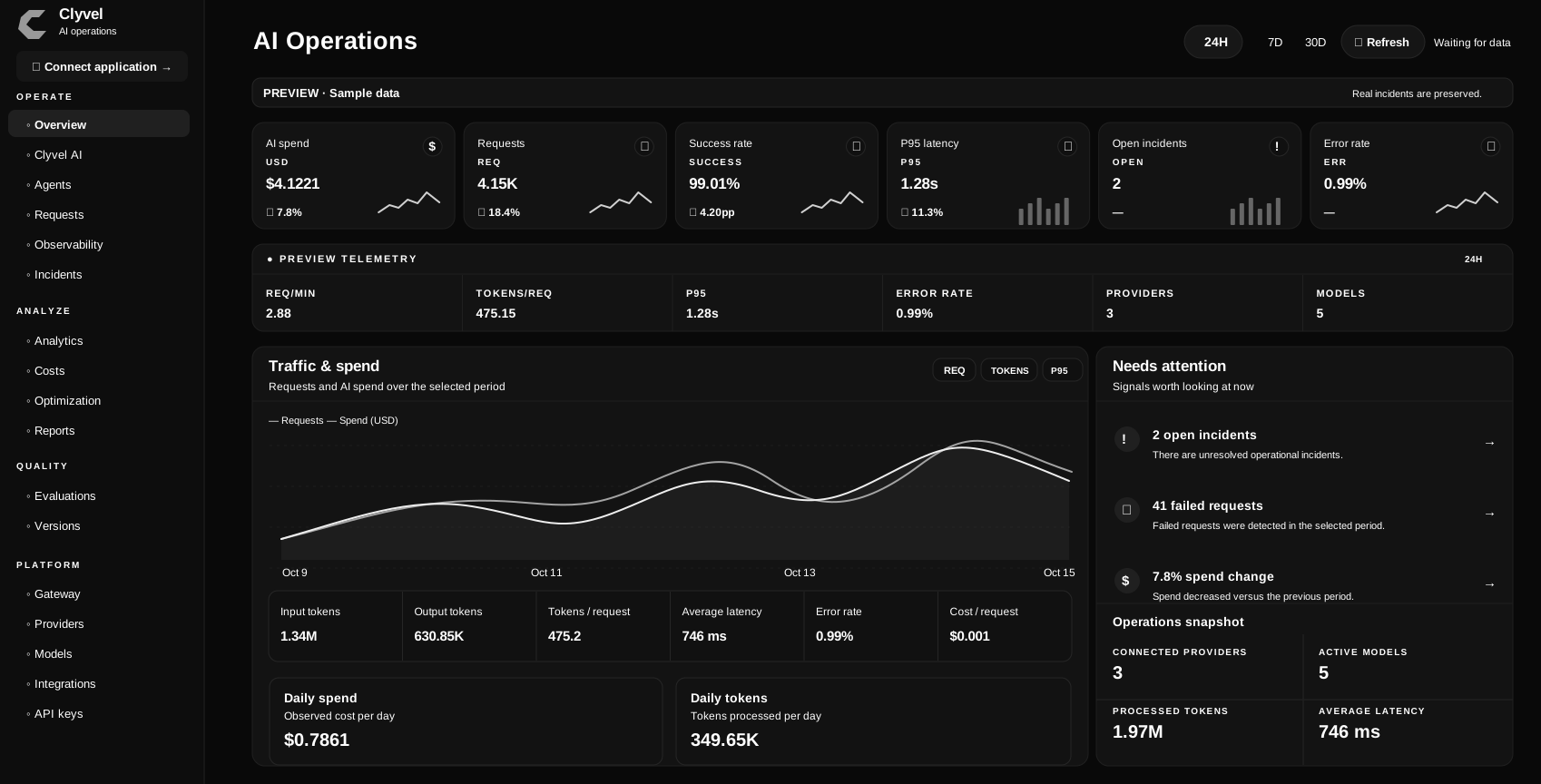
clyvel / workspace / overviewSample data
Illustrative dark Clyvel dashboard with requests, costs, latency, telemetry and incidents.

Start with one application. Grow with your team.

Free

For your first telemetry insights.

Monitor your models, requests and costs.

Start free
US$0/month
  • 50,000 requests/month
  • 25 Copilot credits/month
  • 7 days of retention
  • Tokens, costs, latency and errors
  • No automatic overage charges

AI providers bill separately.

Starter

For your first live applications.

Monitor your models, requests and costs.

Choose Starter
US$19/month
  • 100,000 requests/month
  • 100 Copilot credits/month
  • 15 days of retention
  • Tokens, costs, latency and errors
  • No automatic overage charges

AI providers bill separately.

ProRecommended

More capacity for production.

Monitor your models, requests and costs.

Choose Pro
US$39/month
  • 300,000 requests/month
  • 300 Copilot credits/month
  • 30 days of retention
  • Tokens, costs, latency and errors
  • No automatic overage charges

AI providers bill separately.

Compare all plans

Less tool switching. More clarity.

Connect your first application
ApplicationClyvel Gateway
OpenAIAnthropicGemini

One connection. Your models.

Connect OpenAI, Anthropic and Google through one Gateway.

REQUEST ACTIVITYILLUSTRATION
POST /chat/completions200 OK

Understand every request.

See usage, latency and errors with the context to investigate.

COST BREAKDOWNILLUSTRATION
Application / support
Application / agents
Application / search
ApplicationProviderModel

Costs you can explain.

Track spend by application, provider and model. Set budgets.

RELIABILITYILLUSTRATION
Latency thresholdAlert
Provider healthHealthy

Spot problems early.

Get alerts for errors, slow requests and unusual behavior.

OPTIMIZATIONILLUSTRATION
Compare model routes
Current route
Candidate route
EvidenceReviewDecision

Find savings with evidence.

Review cost-saving opportunities before deciding what to change.

GOVERNANCEILLUSTRATION
Access policyEnforced
Approved modelsAllowed
Restricted modelsBlocked
Policy updatedRecorded in audit history

Set rules. Keep a record.

Manage model access, permissions and change history.

GET STARTED

Your stack stays the same. Your visibility changes.

Connect your existing tools and start seeing data from the first request.

See connection options
01

Choose how to connect

Use n8n, Make, Python or the integration your application already has.

02

Copy one URL and one key

Replace the destination your application sends AI requests to. The rest of your setup can stay the same.

03

Start seeing your data

From the first request, see usage, cost, response time and errors.

Common questions.

Read the documentation →
Do I need to rebuild my application?

No. Keep your application or workflow where it runs today. Point its AI requests to Clyvel and Clyvel records what happens.

What happens if I use all the requests included in my plan?

Clyvel pauses recording new data until more capacity is available. Your application keeps using OpenAI, Anthropic, Google or your other configured providers normally.

What does Clyvel charge for?

Clyvel charges for monitoring, controls and the number of requests it can record. OpenAI, Anthropic, Google or other AI providers bill their own model usage separately.

Can Clyvel AI change my application automatically?

No. Clyvel AI is read-only. It can explain requests, costs, incidents, budgets and savings opportunities, but you decide what to change.

Put your AI in perspective.

Connect your first application.

Start freeView the platform

Platform

  • Overview
  • AI Gateway
  • Observability
  • FinOps
  • Reliability

Solutions

  • Optimization
  • Governance
  • Clyvel AI
  • Pricing
  • Enterprise

Resources

  • Documentation
  • Blog
  • Resources
  • Start free

Company

  • Home
  • For businesses
  • Contact
  • Sign in

Legal & security

  • Privacy policy
  • Terms of use
  • Security
  • Refund policy
  • Cookies
  • Data processing
Clyvel

© 2026 Clyvel